
Docker is a packaging and deployment system. It allows you to package an application as a “docker image“, then deploy it easily on some servers with a single “docker start <image>” command.
Packaging an application
Packaging an application without Docker

- A developer pushes a change
- The CI sees that new code is available. It rebuilds the project, runs the tests and generates a package
- The CI saves all files in”dist/*” as build artifacts
The application is available for download from “ci.internal.mycompany.com/<project>/<build-id>/dist/installer.zip”
Packaging an application with Docker
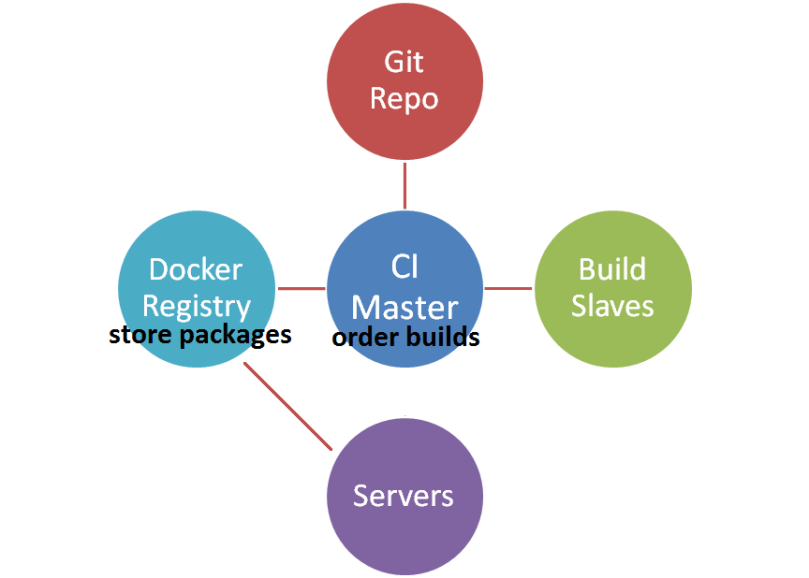
- A developer pushes a change
- The CI sees that new code is available it. It rebuilds the project, runs the tests and generates a docker image
- The docker image is saved to the docker registry
The application is available for download as a docker image named “auth:latest” from the registry “docker-registry.internal.mycompany.com”.
You need a CI pipeline
A CI pipeline requires a source code repository (GitLab, GitHub, VisualSVN Server) and a continuous integration system (Jenkins, GitLab CI, TeamCity). Docker also needs a docker registry.
A functional CI pipeline is a must-have for any software development project. It will ensure that your application(s) are automatically re-run, re-tested and re-packaged on every change.
The developers gotta write scripts to build their application, to run tests and to generate packages. Only the developers of an application can do that because they are the only ones to have the knowledge about how things are supposed/expected to work.
Generally speaking, the CI jobs should mostly consist into calling external scripts, like “./build.sh && ./tests.sh”. The scripts themselves must be part of the source code, they’ll evolve with the application.
You need to know your applications
Please answer the following questions:
- What does the application need to be built?
- What’s the command/script to build it?
- What does the application need to run?
- What configuration file is needed and where to put it?
- What’s the command to start/stop the application?
You need to be able to answer all these questions, for all the applications you’re writing and managing.
If you don’t know the answers, you have a problem and Docker is NOT the solution. You gotta figure out how things works and write documentation! (Better hope the guys who were in charge are still working here and gave a thought about all that).
If you know the answers, then you’re good. You know what has to be done. Whether it will be executed by bash, ansible, DockerFile, spec or zip is just an implementation detail.
Deploying an application
Deploying an application without Docker
- Download the application
- Setup dependencies, services and configuration files
- Start the application
# ansible pseudo code
hosts: hosts_auth
serial: 1 #rolling deploy, one server at a time
become: yes

tasks:
  name: instance is removed from the load balancer
  elb_instance:
    elb_name: auth
    instance_id: "{{ ansible_ansible_id }}"
    state: absent

  name: service is stopped
  service:
    name: auth
    state: stopped

  name: existing application is deleted
  file:
    path: /var/lib/auth/
    match: "*"
    recursive: yes
    state: absent

  name: application is deployed
  unarchive:
    url: https://ci.internal.mycompany.com/auth/last/artifacts/installer.zip
    destination:: /var/lib/auth

  name: virtualenv is setup
  pip:
    requirements: /var/lib/auth/requirements.txt
    virtualenv: /var/lib/auth/.venv

  name: application configuration is updated
  template:
    src: auth.conf
    dst: /etc/mycompany/auth/auth.conf

  name: service configuration is updated
  template:
    src: auth.service
    dst: /etc/init.d/mycompany-auth

  name: service is started
  service:
    name: auth
    state: running

  name: instance is added to the load balancer
  elb_instance:
    elb_name: auth
    instance_id: "{{ ansible_ansible_id }}"
    state: present
Deploying an application with Docker
- Create a configuration file
- Start the docker image with the configuration file
# ansible pseudo code
hosts: hosts_auth
serial: 1 #rolling deploy, one server at a time
become: yes

tasks:
  name: instance is removed from the load balancer
  elb_instance:
    elb_name: auth
    instance_id: "{{ ansible_ansible_id }}"
    state: absent

  name: container is stopped
  docker:
    name: auth
    state: stopped

  name: configuration is updated
  template:
    src: auth.conf
    dst: /etc/mycompany/auth/auth.conf

  name: container is started
  docker:
    name: auth
    image: docker-registry.internal.mycompany.com/auth:latest
    state: started
    mount:
      /etc/mycompany/auth/auth.conf:/etc/mycompany/auth/auth.conf
    port:
      8101:8101

  name: instance is added to the load balancer
  elb_instance:
    elb_name: auth
    instance_id: "{{ ansible_ansible_id }}"
    state: present
Notable differences
With docker, the python setup/virtualenv and the service configuration is done during the image creation rather than during the deployment. (The commands are the same, they’re just done in an earlier build stage).
The configuration files are deployed on the host and mounted inside Docker. It would be possible to bake the configuration file into the image but some configurations might only be determined at deployment time and we’d rather not store secrets in the image.
Infrastructure
Docker is only a packaging and deployment tool.
Docker doesn’t handle auto scaling, it doesn’t have service discovery, it doesn’t reconfigure load balancers, it doesn’t move containers when servers fail.
Orchestration systems (notably Kubernetes) are supposed to help with that. Currently, they are quite experimental and very difficult to setup [beyond a proof of concept]. The lack of proper orchestration will limit Docker to only be a hype packaging & deployment tool for the foreseeable future.
Docker [even with Kubernetes] needs an existing environment to run, including servers and networks. It ain’t gonna install and configure itself either.
All of that has to be done manually. Order servers in the cloud. Create OS images with Packer. Configure VPC and networking with Terraform. Setup the servers and systems with Ansible. Install and deploy the applications (including docker images) with Ansible.
Cheat Sheet
- Figure out what is required and how to build the applications
- Write build, test and packaging scripts
- Document that in the README
- Setup a CI system
- Configure automatic builds after every change
- Figure out the application dependencies and how to run it
- Add that to the README
- Write deploy and setup scripts (with Ansible or Salt)
Conclusion
Packaging and deploying applications is a real and challenging job. A Debian package has some good practices and standards to follow whereas Docker comes with no good practices and no rules whatsoever. Docker is a [marketing] success in part because it gives the illusion that the task is easy, with a sense of coolness.
In practise though, it is hard and there is no way around it. You’ll have to figure out your needs and decide on a practical way to deploy and package your applications that will be tailored just for you. Docker is not the solution to the problem, it’s just a random tool among many others, that may or may not help you.
It’s fair to say that the docker ecosystem is infinitely complex and has a long learning curve. If you have neat applications with clear and limited dependencies, they should be relatively manageable and docker can’t make it any easier. On the contrary, it has the potential to make it harder.
Docker shines to package applications with complex messy dependencies (typical NodeJS and Ruby environments). The dependency hell is taken away from the host and moved into the image and the image creation scripts.
Docker is handsome for dev and test environments. It allows to run multiple applications easily on the same host, isolated from each other. Better yet, some applications have conflicting dependencies and would be impossible to run on a single host otherwise.
You should investigate a configuration management system (Ansible) if you don’t already have one. It will help you to manage, configure and setup [numerous] remote servers, à la SSH on steroid. It’s way more general and practical than Docker (and you’re gonna need it to install docker and deploy images anyway).
Reminder: In spite of the practical use cases, docker should be considered as a beta tool not quite ready for serious production.
 The HFT Guy