
Disclaimer: None of this is written by AI, I’m still a real person writing my own blog like its 1999
I finally figured out how to do Gigabit Ethernet over my existing phone wires.
Powerline adapter and misery
I’ve mostly lived with powerline adapters over recent years. Some worked well, some did not (try few and return what doesn’t work in your home). One I had for a while gave me stable 30 Mbps, which was little but good enough for internet at the time. I care very much about having stable low latency for gaming, more than bandwidth.
Fast forward to my current situation, that powerline adapter regularly lost connection which was a major problem. I got some new ones with the latest and greatest G.hn 2400 standard. The final contender served around 180 Mbps to my office (with high variance 120 to 280 Mbps), or around 80 Mbps to the top floor. It’s good enough to watch YouTube/TV yet it’s far from impressive.
One peculiar thing from the UK: Internet providers don’t truly offer gigabit internet. They have a range of deals like 30 Mbps – 75 Mbps – 150 Mbps – 300 Mbps – 500 Mbps – 900 Mbps, each one costing a few more pounds per month than the last. This makes the UK simultaneously one of the cheapest and one of the most expensive countries to get Internet.
Long story short, new place, new hardware, new deals, the internet has been running at 500 Mbps for some time now.
Every 50 GB of Helldivers 2 update (because these idiots shipped the same content in duplicate 5 times) is a painful reminder that the setup is not operating at capacity.
Problem: How to get 500 Mbps to my room?
A Fetish for Phone Sockets
I’ve been looking for a way to reuse phone wires for a while, because British houses are full of phone sockets. There are 2 sockets in my office room.
I can’t stress enough how much we love our phone sockets. It’s not uncommon to have a one bed flat with 2 phone sockets in the living room and 2 phone sockets in the bedroom and a master socket in the technical room. It’s ridiculous.
A new house bought today could have 10 phone sockets and 0 Ethernet sockets. There is still no regulation that requires new build to get Ethernet wiring (as far as I know).
There’s got to be a way to use the existing phone infrastructure.
I know the technology exists. It’s one of the rare cases where the technology exists and is mature, but nobody can be bothered to make products for it.
The standards that run powerline adapters (HomePlug AV200, AV500, G.hn 2400) can work with any pair of wires. It should work ten times better on dedicated phone wires instead of noisy power wires, if only manufacturers could be bothered to pull their fingers out of their arse and make the products that are needed.
After countless years of research, I finally found one German manufacturer that’s making what needs to be made https://www.gigacopper.net/wp/en/home-networking/
Ordering
It’s made and shipped from Germany.
I was lazy so I ordered online in self-service (which is definitely the wrong way to go about it). It’s available on Ebay DE and Amazon DE, it’s possible to order from either with a UK account, make sure to enter a UK address for delivery (some items don’t allow it).
The better approach is almost certainly to speak to the seller to get a quote, with international shipping and the import invoice excluding VAT (to avoid paying VAT on VAT).
Delivery Hell
The package got the usual Royal Mail treatment:
- The package was shipped by DHL Germany
- The package was transferred to Royal Mail when entering the UK
- After some days, the DHL website said they tried to deliver but nobody home, this is bullshit
- Royal website said the package reached the depot and was awaiting delivery, this is bullshit
- In reality, the package was stuck at the border, as usual
- Google to find “website to pay import fee on parcel”
- https://www.royalmail.com/receiving-mail/pay-a-fee
- Entered the DHL tracking number into the Royal Mail form for a Royal Mail tracking number
- The website said that the parcel had import fees to pay, this is correct
- Paid the fee online, 20% VAT + a few pounds of handling fees
- The package will be scheduled for delivery a few days later
- Royal Mail and DHL updated their status another two or three times with false information
- Royal Mail delivered a letter saying there was a package waiting on fees, though it was paid
- The package finally arrived
Basically, you need to follow the tracking regularly until the package is tagged as lost or failed delivery, which is the cue to pay import fees.
It’s the normal procedure to buy things from Europe since Brexit 2020. It’s actually quite shocking that Royal Mail still hasn’t updated their tracking system to be able to give a status “waiting on import fees to be paid online”. They had 6 years!
Items
This is the gigacopper G4201TM: 1 RJ11 phone line, 1 RJ45 gigabit Ethernet port, 1 power
Shopping list:
- A pair of gigacopper G4201TM
- The device has a German power socket (expected)
- It came with a German to UK power adapter (unexpected and useful)
- It came with a standard RJ11 cable (expected and useless)
- Found BT631A to RJ11 cables online (the standard UK phone socket)
- Found Ethernet cables in my toolbox
- 3M removable hanging strip to stick to the wall, the device is very light
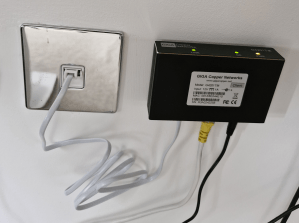
There is a gigacopper G4202TM: with an RJ45 to connect to the phone line instead of a RJ11 (not sure if it’s a newer model or just a variant, as that one has two gigabit Ethernet ports). Don’t be confused by having a RJ45 port that is not a RJ45 port.
There is a gigacopper G4201C (1 port) and G4204C (4 port) for Ethernet over coaxial. Some countries have coax in every room for TV/satellite. This may be of interest to some readers.
Testing
Plugged it and it works!
Full speed achieved.
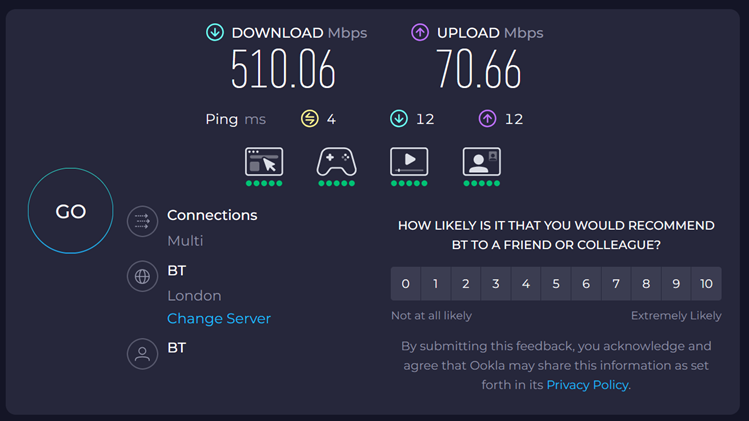

Reminder, this is a 500 Mbps internet connection.
InHome Variant
I discovered soon afterwards that I bought the wrong item. There is an InHome and a Client/Server variant of the product. Make sure to buy the InHome variant.
- The InHome variant can have up to 16 devices, communicating to any peer on the medium, with sub millisecond latency.
- The client-server variant is preconfigured as a pair, splitting the bandwidth 70% download / 30% upload, with few milliseconds latency. I think it’s a use case for ISP and long range connections.
Thankfully the difference is only the firmware. I spoke to the vendor who was very helpful and responsive. They sent me the firmware and the tools to patch.
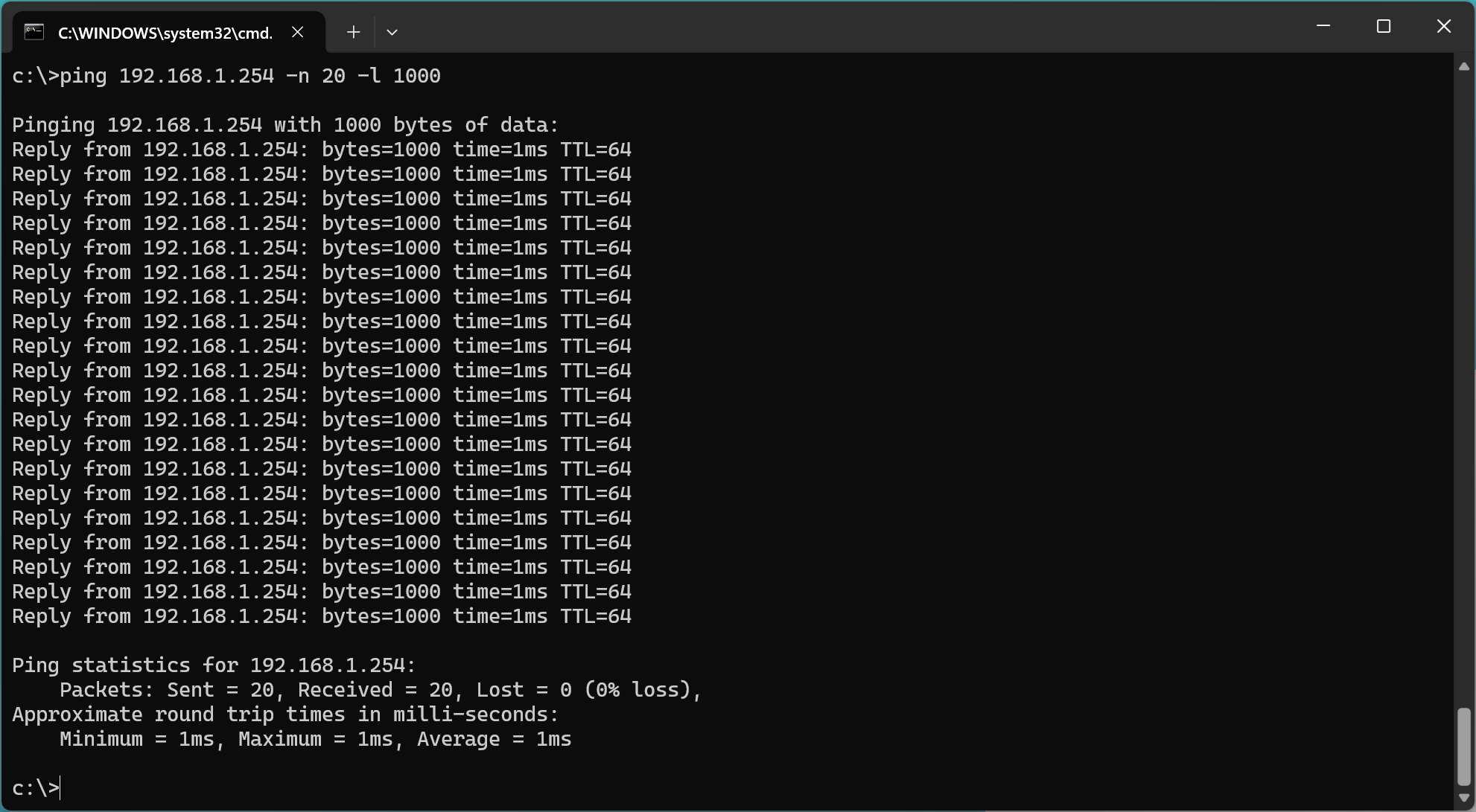
I have a fetish for low latency. This screenshot is oddly satisfying.
Gigabit
The web interface says 1713 Mbps on the physical layer, the debugging tool says PHONE 200MHz – Connected 1385 Mbps.
I wanted to verify whether the device can do a full Gigabit. Unfortunately I realized I don’t have any device that can test that.
Phones are wireless, which is too slow to test anything. I checked out of curiosity, my phone did 100 Mbps to 400 Mbps right next to the router. Grabbed two laptops only to realize they didn’t have any Ethernet port. I dug up an old laptop from storage with an Ethernet port. The laptop couldn’t boot, the CPU fan didn’t start and the laptop refused to boot with a dead fan.
There is a hard lesson here: 1 Gbps ought to be enough for any home. Using the phone line is as good as having Ethernet wiring through the house if it can deliver a (shared) 1.7 Gbps link to multiple rooms.
Still, I really wanted to verify that the device can do a full Gbps, I procured an USB-C to Ethernet adapter.
It works!
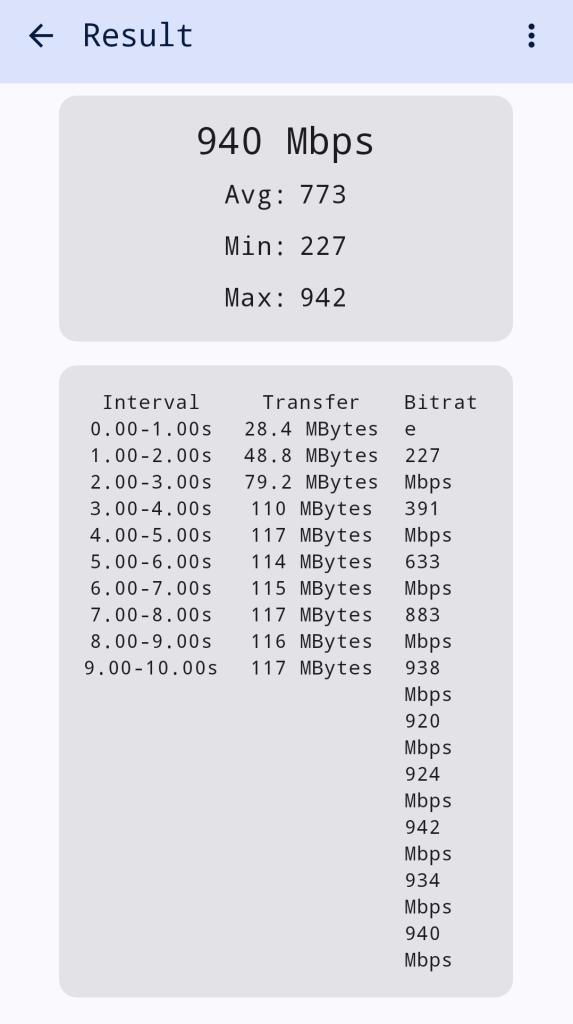
Full speed achieved, testing from a phone to a computer with iperf3.
Wiring
Some readers might wonder about the wiring.
I didn’t check the wiring before buying anything because it’s pointless. British sockets are always daisy chained in an incomprehensible maze.
Phone sockets need 2 wires and can be daisy chained. Ethernet sockets need 8 wires. They often use the same Cat5 cable because it’s the most widely available (8 wires cable, the 6 extra wires can remain unconnected).
It’s possible to swap the phone socket for an RJ45 socket, if you only have 2 sockets connected with the right cable. It’s not possible when sockets are daisy chained. (You could put a double or triple RJ45 socket with a switch to break a daisy chain, but it quickly becomes impractical in a British house with 5 to 10 sockets in an arbitrary layout.)
I opened one socket in the office room. There are two Cat5 cables daisy chained. There are 3 wires connected.
It’s probably daisy chained with the other socket in the room, or it’s daisy chained with the socket in the other room that’s closer. Who knows.
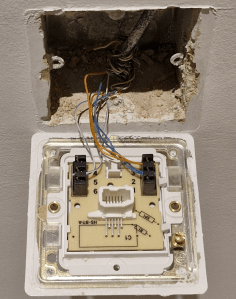
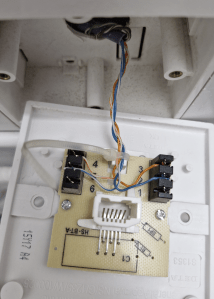
I opened the BT master socket in the technical room. It should have the cables coming from the other rooms. It should connect the internal phone wires with the external phone line.
There is one single Cat5 cable. There are 4 wires connected. It’s definitely not a master socket. WTF?!
It’s interesting that this socket has 4 wires connected but the socket in the office has 3 wires connected. The idiot who did the wiring was inconsistent. The gigacopper device can operate over 2 wires (200 MHz Phone SISO) or over 4 wires (100 MHz Phone MIMO). I can try the other modes if I finish the job.
The search for the master socket continues. The cables from the other floors should all be coming down somewhere around here. There is a blank plate next to it (right).
This might be the external phone line? A bunch of wires are crimped together, colours do not match. It’s the hell of a mess.
Only sure thing, they are different cables because they are different colours. They might be going to a junction box somewhere else. Probably behind a wall that’s impossible to access!
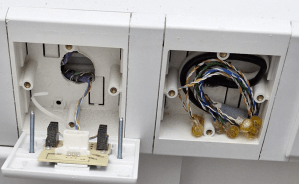
Conclusion: There is zero chance to get proper Ethernet wiring out of this mess.
The gigacopper device to do gigabit Ethernet over phone line is a miracle!
There is an enormous untapped market for gigabit Ethernet over phone sockets in the UK.
 The HFT Guy
[…] 文章來源:Doing Gigabit Ethernet Over My British Phone Wires […]
LikeLike
Thank you for this write up/review.
We are moving to a new build house this spring and we have specified coax points in each room as well as the ‘server cupboard’ i.e. under the stairs where the BT ONT will come in. The coax cables all terminate in the attic.
We are planning to use Giga Copper’s G.Hn over coax for most of the rooms, but I was also very interested about using the G.Hn over phone line devices, for a dedicated link between the phone socket in the server cupboard and the phone socket behind where the TV cabinet will be.
Your article has given me a lot of confidence.
Regarding shipping, did you contact Giga Copper direct to organise the international shipping? I had been looking at getting them shipped from the website to one of these re-shipping services, but if there is a better or cheaper way then I would love to avail.
LikeLike
Hello,
I was lazy and didn’t feel like speaking to anyone, I bought on Amazon DE, Amazon allowed me to put a UK address for delivery for an extra fee. Pretty sure I overpaid between the double VAT and the auto estimated shipping fee.
If I had to do it again, I would definitely drop a message on their email info@gigacopper.net, to get a quote for N products with UK delivery to my address.
I don’t see a point in re-shipping services when the seller can ship to the UK just fine. The hassle is to have to pay 20% VAT on entry to the UK, there isn’t a workaround for that, just have to pay 😀
LikeLike
Congratulations on the new house! 🙂
I’m curious why you specified coax instead of something more useful like CAT6, Cat6A or even fiber? Perhaps coax is actually used for TV etc. over there still? If not, actual network cable seems like a simpler and cheaper solution that also delivers better performance. 🙂
LikeLike
Internal voice cabling may look like Cat5, but it is more likely to be CW1308, which is closer to Cat3 and only needed two pairs (A, B and BELL so 3x conductors).
Builders used 2-pair, “Proper BT” used 3-pair, 4-pair Cat5e was often easier to obtain in a shop.
100Mbps Ethernet can *sometimes* work over two pair CW1308 at full-duplex, but increasingly devices expect all four pairs for 1Gbps and above.
The thinner gauge and lack of twists of CW1308 doesn’t help.
To trace internal cabling the standard tool for decades has been a “tone and probe” set. This is a signal generator with two croc-clips, and a separate high-gain amplifier which capacitively couples to cables.Basically, clip the sig-gen on at one end and poke the probe near random cables until you hear the tone the loudest!
These used to be relatively expensive, but eBay now sells cheap “tone and probe” kits. Mine was under £20, works well, and included a passive Cat5e tester.
I’ve seen some cabling horror-shows in the past. Following the Openreach entry point doesn’t always make things obvious. A friend’s ADSL improved 10x when we found the line was looped via an outbuilding that used to have an auto-dialling alarm system!
Using what is effectively an xDSL modulator to send Ethernet over crap cable does seem a better solution that Power-Line Ethernet as these devices tended to die when the Class X & Y capacitors gave up after only a few years.
The manufacturer seems rather nice and deserving of more customers – giving you firmware to change type is a classy move!
Anyways, thanks for the read!
James
LikeLike
My house was wired up for a burglar alarm with some cheapo 8 core alarm cable. This is aluminium conductor with 8 cores untwisted. I’ve run 1gige over it for short runs of about 10m. Will post an update in a couple of years when I upgrade to 2.5gige!
LikeLike
Interesting to hear that you were using 8 core alarm cable. Looks like I have similar cable. It might be OK within our house. Unfortunately I need a connection to outdoor study that would be a cable run of 50m. Sceptical if that will work. Tried the through the power wiring method – that was marginal at best. Toying with the idea of updating to the latest variant. Also tried the wireless point to point at 5GHz – that works OK except when it rains heavily.
Open to suggestions.
LikeLike
You should definitely try the giga copper device, it’s designed to do exactly what you need, connecting an annex or a block of flats with existing wires (connection up to 800m, gigabit up to 150m).
It will detect exactly what frequency and bandwidth your wires can do. You will probably get close enough to a gigabit on 50m of untwisted pair.
LikeLike
Thanks for your comments/suggestions
The wires were installed by the previous owner to run telephone in the outbuilding. A bundle of these untwisted cables were buried in a duct with power line – the betting is that they were lashed together when installed so not viable to use one to pull through a Cat 6 network cable. I will give some thought to your suggestion. Hesitant to splash out on the adaptors only to find out that they will not work over untwisted cable over that distance.
As the early series of Devolo adaptors used to work an alternative would be to take the risk and buy a pair of the latest versions. Just wondering why they stopped working – was it always marginal or have they degraded over the years?
LikeLike
They will work on anything. The bandwidth will be limited to few hundreds Mbps if the wires are very long and untwisted.
50m is pretty short. The technology is an evolution from old ADSL/VDSL which were designed to work up to 150 Mbps up to 800m.
LikeLike
Thanks for this post, it’s interesting to know someone still makes these. I have been using the Solwise versions of these for over 10 years for various customers.
First was the PL-TP-E500C https://www.solwise.co.uk/net-powerline-homeplug-pl-tp-e500c.html and then that was replaced by the better GHN-TP-E1000M https://www.solwise.co.uk/net-ghn-tp-e1000m.html and then again by the better GHN-TP-E2000M https://www.solwise.co.uk/net-ghn-tp-e2000m but that was then discontinued, I assume due to low demand (am guessing, I never asked them).
I agree that this in theory is a huge untapped market, but I think it takes relatively techy people to advise and impliment it for people as internal wiring can indeed be terrible. I’ve lost days toning wiring to work out what goes where so I can optimise it and try to reduce interference by removing what isn’t required.
cheers,
Richard.
LikeLike
HI,
Very interesting – have been mildly curious about this, but had the opportunity to put ethernet cables where i needed them. Now i know for my next move.
Also curious if analog phone can work along side? Asking for a friend – don’t own one anymore.
In Canada, early DSL came with low pass filters to connect in line with phone (although i could never hear the data interference anyway). Phones and data could share the same lines.
LikeLike
You can use the line for phone/ADSL/G.hn all at the same time, they use different frequencies.
The phone service will be switched off soon in the UK (and other countries), it won’t be a concern for much longer.
LikeLike
The low-pass filter wasn’t to keep the data from interfering with the voice calls; it was to keep the voice from interfering with the data!
LikeLike
Ah, yes, finally GIGACOPPER is getting more attention. I bought my G4201TM set in Q4 2021, because Powerline refuses to work properly from one floor to another, I still use Powerline on the same floor, but it only drops out once a month, instead of multiple times and speed went up from 30Mbps to 70Mbps (my connection is only 100Mbps so no problem atm using it). It’s working without issues since then and running 24/7, also price didn’t even went up that much, from 242€ to 269€ in 4 years, and they sent me the software to reconfigure as well. Btw is that still written in Java, or did they move to JavaFX like every Java tool should do?
Now about the G4202T (not TM), it actually has 4 ports, 2 RJ45 for gigabit ethernet, one blue RJ45 for the phone line and (what is really cool) a yellow RJ45 for your standard non DECT compatible phone (or answering machine). There’s no problem with using RJ45 for everything, because you can plug RJ11 6p2c plugs into RJ45 sockets, due to the people in the past being smart and used the center pins first.
And if BT631A is so much more common in the UK (like TAE-F in Germany) maybe drop them a mail to adjust package content for UK buyers.
LikeLike
Interesting post, both the part about UK homes having so many phones jacks still and also the part about the GIGACOPPER. I didn’t know such a device existed to be honest, so bringing some attention to them for people who need them certainly doesn’t hurt. 🙂
Over here in Sweden, phone jacks stopped being installed in new houses/apartments as a standard at least 20 years ago, if I recall correctly. Ethernet jacks terminating in a network cupboard is standard for apartments, while for houses I believe you simply specify exactly how you want it.
Back during the time of DSL, phone jacks were naturally very common though and pretty much everyone I know suddenly had to learn how to identify the first jack in the chain and how to move the wires so that the DSL splitter worked correctly. 😀
LikeLike
Found this through “Chip”, a German IT Magazine. That is exactly what I was looking for!!!
Thanks for the write up. Will research that more once I am back home !!!
LikeLike
Re the issues with delivery: if it’s any comfort, I sent a parcel to a friend in Glasgow a while back and, when I checked the tracking it turned out it had been sent to Coventry. I didn’t know that was a literal thing.
“British sockets are always daisy chained in an incomprehensible maze.” Heh. Don’t even think about taking a look at your mains power distribution.
LikeLike