
Disclaimer: None of this is written by AI, I’m still a real person writing my own blog like its 1999
I finally figured out how to do Gigabit Ethernet over my existing phone wires.
Powerline adapter and misery
I’ve mostly lived with powerline adapters over recent years. Some worked well, some did not (try few and return what doesn’t work in your home). One I had for a while gave me stable 30 Mbps, which was little but good enough for internet at the time. I care very much about having stable low latency for gaming, more than bandwidth.
Fast forward to my current situation, that powerline adapter regularly lost connection which was a major problem. I got some new ones with the latest and greatest G.hn 2400 standard. The final contender served around 180 Mbps to my office (with high variance 120 to 280 Mbps), or around 80 Mbps to the top floor. It’s good enough to watch YouTube/TV yet it’s far from impressive.
One peculiar thing from the UK: Internet providers don’t truly offer gigabit internet. They have a range of deals like 30 Mbps – 75 Mbps – 150 Mbps – 300 Mbps – 500 Mbps – 900 Mbps, each one costing a few more pounds per month than the last. This makes the UK simultaneously one of the cheapest and one of the most expensive countries to get Internet.
Long story short, new place, new hardware, new deals, the internet has been running at 500 Mbps for some time now.
Every 50 GB of Helldivers 2 update (because these idiots shipped the same content in duplicate 5 times) is a painful reminder that the setup is not operating at capacity.
Problem: How to get 500 Mbps to my room?
A Fetish for Phone Sockets
I’ve been looking for a way to reuse phone wires for a while, because British houses are full of phone sockets. There are 2 sockets in my office room.
I can’t stress enough how much we love our phone sockets. It’s not uncommon to have a one bed flat with 2 phone sockets in the living room and 2 phone sockets in the bedroom and a master socket in the technical room. It’s ridiculous.
A new house bought today could have 10 phone sockets and 0 Ethernet sockets. There is still no regulation that requires new build to get Ethernet wiring (as far as I know).
There’s got to be a way to use the existing phone infrastructure.
I know the technology exists. It’s one of the rare cases where the technology exists and is mature, but nobody can be bothered to make products for it.
The standards that run powerline adapters (HomePlug AV200, AV500, G.hn 2400) can work with any pair of wires. It should work ten times better on dedicated phone wires instead of noisy power wires, if only manufacturers could be bothered to pull their fingers out of their arse and make the products that are needed.
After countless years of research, I finally found one German manufacturer that’s making what needs to be made https://www.gigacopper.net/wp/en/home-networking/
Ordering
It’s made and shipped from Germany.
I was lazy so I ordered online in self-service (which is definitely the wrong way to go about it). It’s available on Ebay DE and Amazon DE, it’s possible to order from either with a UK account, make sure to enter a UK address for delivery (some items don’t allow it).
The better approach is almost certainly to speak to the seller to get a quote, with international shipping and the import invoice excluding VAT (to avoid paying VAT on VAT).
Delivery Hell
The package got the usual Royal Mail treatment:
- The package was shipped by DHL Germany
- The package was transferred to Royal Mail when entering the UK
- After some days, the DHL website said they tried to deliver but nobody home, this is bullshit
- Royal website said the package reached the depot and was awaiting delivery, this is bullshit
- In reality, the package was stuck at the border, as usual
- Google to find “website to pay import fee on parcel”
- https://www.royalmail.com/receiving-mail/pay-a-fee
- Entered the DHL tracking number into the Royal Mail form for a Royal Mail tracking number
- The website said that the parcel had import fees to pay, this is correct
- Paid the fee online, 20% VAT + a few pounds of handling fees
- The package will be scheduled for delivery a few days later
- Royal Mail and DHL updated their status another two or three times with false information
- Royal Mail delivered a letter saying there was a package waiting on fees, though it was paid
- The package finally arrived
Basically, you need to follow the tracking regularly until the package is tagged as lost or failed delivery, which is the cue to pay import fees.
It’s the normal procedure to buy things from Europe since Brexit 2020. It’s actually quite shocking that Royal Mail still hasn’t updated their tracking system to be able to give a status “waiting on import fees to be paid online”. They had 6 years!
Items
This is the gigacopper G4201TM: 1 RJ11 phone line, 1 RJ45 gigabit Ethernet port, 1 power
Shopping list:
- A pair of gigacopper G4201TM
- The device has a German power socket (expected)
- It came with a German to UK power adapter (unexpected and useful)
- It came with a standard RJ11 cable (expected and useless)
- Found BT631A to RJ11 cables online (the standard UK phone socket)
- Found Ethernet cables in my toolbox
- 3M removable hanging strip to stick to the wall, the device is very light
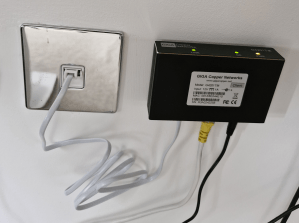
There is a gigacopper G4202TM: with an RJ45 to connect to the phone line instead of a RJ11 (not sure if it’s a newer model or just a variant, as that one has two gigabit Ethernet ports). Don’t be confused by having a RJ45 port that is not a RJ45 port.
There is a gigacopper G4201C (1 port) and G4204C (4 port) for Ethernet over coaxial. Some countries have coax in every room for TV/satellite. This may be of interest to some readers.
Testing
Plugged it and it works!
Full speed achieved.
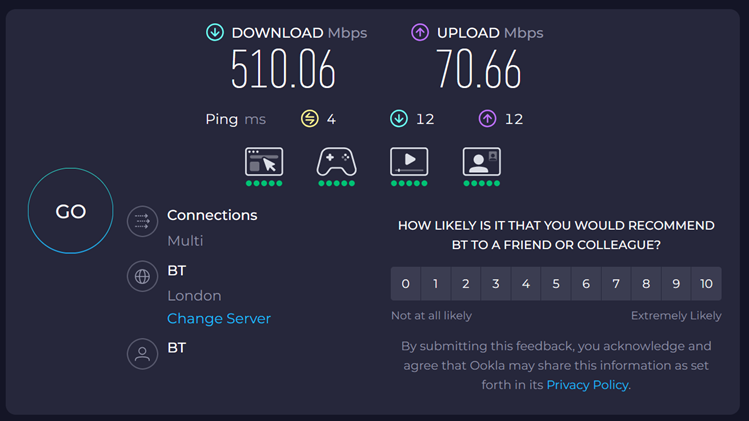

Reminder, this is a 500 Mbps internet connection.
InHome Variant
I discovered soon afterwards that I bought the wrong item. There is an InHome and a Client/Server variant of the product. Make sure to buy the InHome variant.
- The InHome variant can have up to 16 devices, communicating to any peer on the medium, with sub millisecond latency.
- The client-server variant is preconfigured as a pair, splitting the bandwidth 70% download / 30% upload, with few milliseconds latency. I think it’s a use case for ISP and long range connections.
Thankfully the difference is only the firmware. I spoke to the vendor who was very helpful and responsive. They sent me the firmware and the tools to patch.
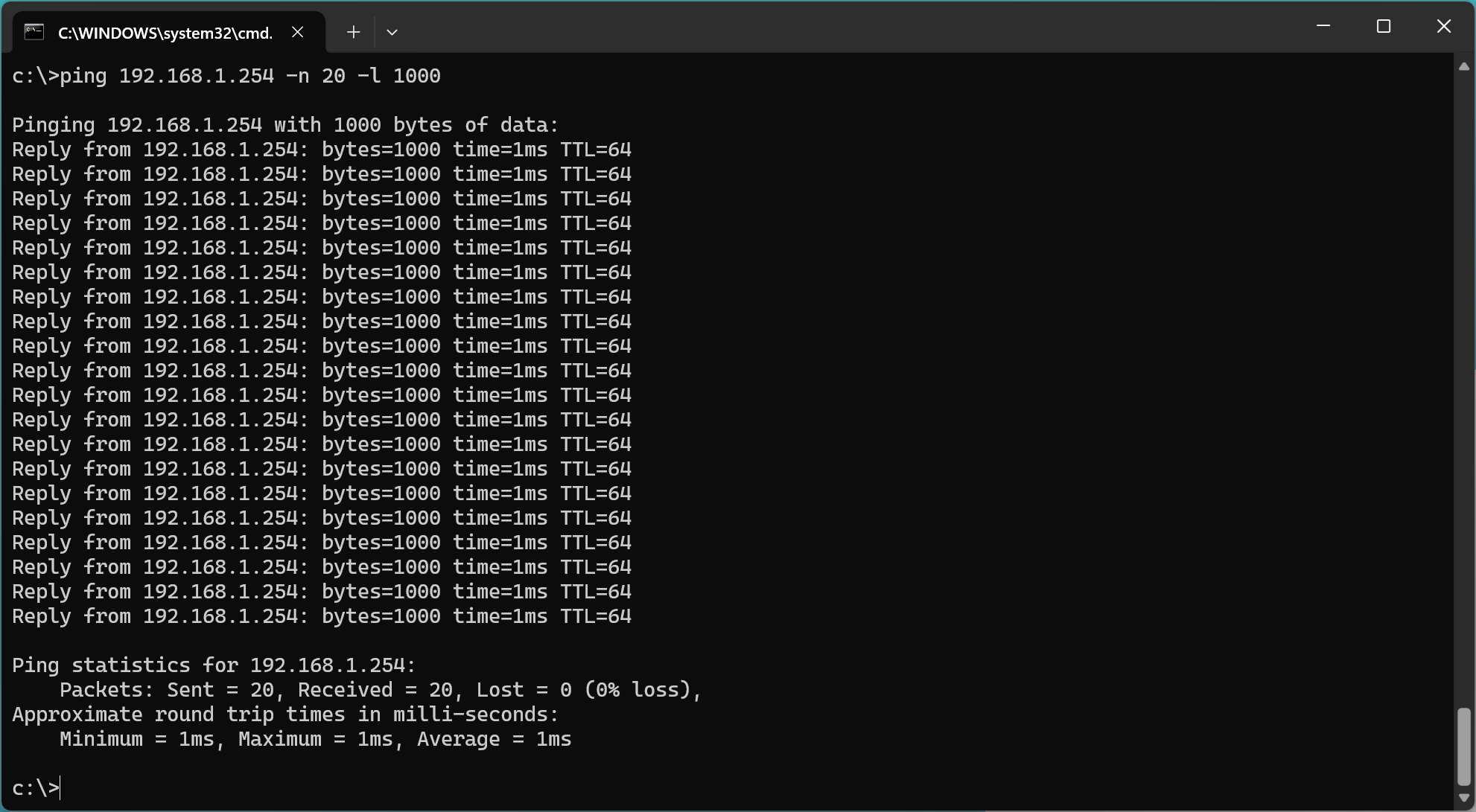
I have a fetish for low latency. This screenshot is oddly satisfying.
Gigabit
The web interface says 1713 Mbps on the physical layer, the debugging tool says PHONE 200MHz – Connected 1385 Mbps.
I wanted to verify whether the device can do a full Gigabit. Unfortunately I realized I don’t have any device that can test that.
Phones are wireless, which is too slow to test anything. I checked out of curiosity, my phone did 100 Mbps to 400 Mbps right next to the router. Grabbed two laptops only to realize they didn’t have any Ethernet port. I dug up an old laptop from storage with an Ethernet port. The laptop couldn’t boot, the CPU fan didn’t start and the laptop refused to boot with a dead fan.
There is a hard lesson here: 1 Gbps ought to be enough for any home. Using the phone line is as good as having Ethernet wiring through the house if it can deliver a (shared) 1.7 Gbps link to multiple rooms.
Still, I really wanted to verify that the device can do a full Gbps, I procured an USB-C to Ethernet adapter.
It works!
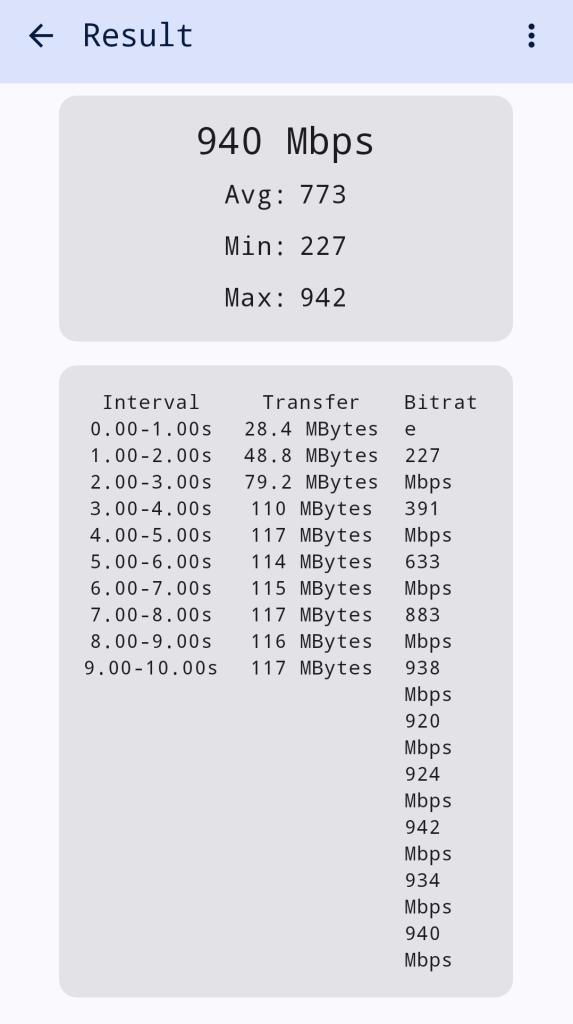
Full speed achieved, testing from a phone to a computer with iperf3.
Wiring
Some readers might wonder about the wiring.
I didn’t check the wiring before buying anything because it’s pointless. British sockets are always daisy chained in an incomprehensible maze.
Phone sockets need 2 wires and can be daisy chained. Ethernet sockets need 8 wires. They often use the same Cat5 cable because it’s the most widely available (8 wires cable, the 6 extra wires can remain unconnected).
It’s possible to swap the phone socket for an RJ45 socket, if you only have 2 sockets connected with the right cable. It’s not possible when sockets are daisy chained. (You could put a double or triple RJ45 socket with a switch to break a daisy chain, but it quickly becomes impractical in a British house with 5 to 10 sockets in an arbitrary layout.)
I opened one socket in the office room. There are two Cat5 cables daisy chained. There are 3 wires connected.
It’s probably daisy chained with the other socket in the room, or it’s daisy chained with the socket in the other room that’s closer. Who knows.
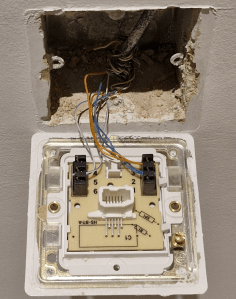
I opened the BT master socket in the technical room. It should have the cables coming from the other rooms. It should connect the internal phone wires with the external phone line.
There is one single Cat5 cable. There are 4 wires connected. It’s definitely not a master socket. WTF?!
It’s interesting that this socket has 4 wires connected but the socket in the office has 3 wires connected. The idiot who did the wiring was inconsistent. The gigacopper device can operate over 2 wires (200 MHz Phone SISO) or over 4 wires (100 MHz Phone MIMO). I can try the other modes if I finish the job.
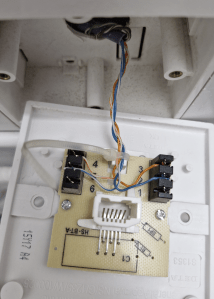
The search for the master socket continues. The cables from the other floors should all be coming down somewhere around here. There is a blank plate next to it (right).
This might be the external phone line? A bunch of wires are crimped together, colours do not match. It’s the hell of a mess.
Only sure thing, they are different cables because they are different colours. They might be going to a junction box somewhere else. Probably behind a wall that’s impossible to access!
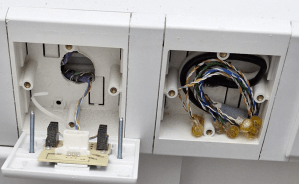
Conclusion: There is zero chance to get proper Ethernet wiring out of this mess.
The gigacopper device to do gigabit Ethernet over phone line is a miracle!
There is an enormous untapped market for gigabit Ethernet over phone sockets in the UK.
 The HFT Guy